
Python3检查文件数并发送邮件
浏览量:749
1、 安装Python3
参考:点击进入
2、安装邮件模块
pip3 search smtplib
3.Python代码
#!/usr/bin/env python3
# -*- coding:utf-8 -*-
__Author__="YoungCheung"
###导入相关模块
import smtplib,sys,os
import email.mime.multipart
import email.mime.text

msg=email.mime.multipart.MIMEMultipart()
msg['from']='emailvip888888@163.com'
msg['to']='992747643@qq.com'
msg['subject']='文件数检查报告'
#判断个数
def fileCountIn(dir):
    return sum([len(files) for root,dirs,files in os.walk(dir)])
if __name__=='__main__':
    if len(sys.argv)==2:
        dir=sys.argv[1]
        if fileCountIn(dir) is not 1:
            pass
###发送内容
content='''
        您好!我们正确文件数量是1,当前文件数为%s,如有变化请及时处理,望知悉!
''' %(fileCountIn(dir))

#文本信息
txt=email.mime.text.MIMEText(content)
msg.attach(txt)
#发送邮件
smtp=smtplib
smtp=smtplib.SMTP()
smtp.connect('smtp.163.com','25')
smtp.login('emailvip888888@163.com','xxxxxxxxxx')
smtp.sendmail('emailvip888888@163.com','992747643@qq.com',str(msg))
smtp.quit()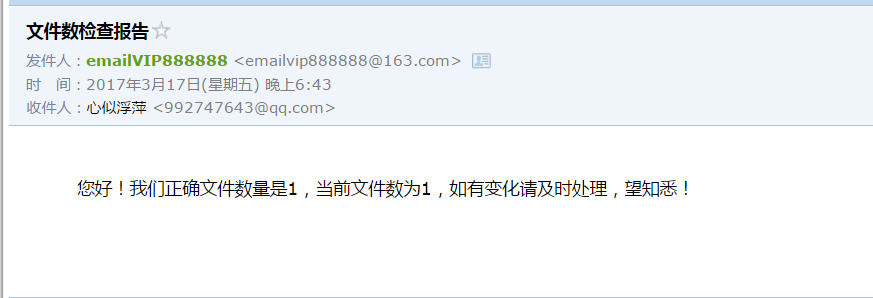
邮件发送成功!!!
神回复
发表评论:
◎欢迎参与讨论,请在这里发表您的看法、交流您的观点。