
Ansible简单介绍和安装
浏览量:1280
一、基础介绍
1.1 Ansible简介
1.2 特性
1.3 特点
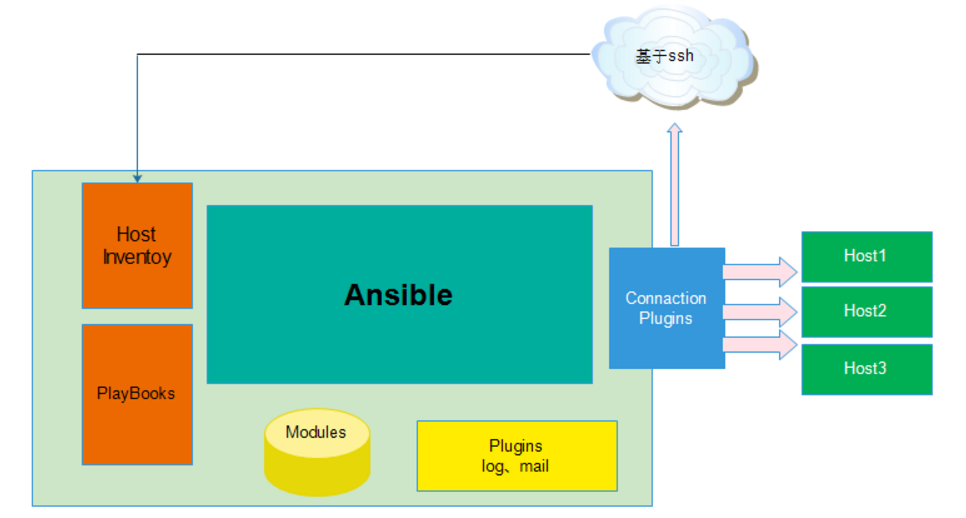
1.4 ansible架构
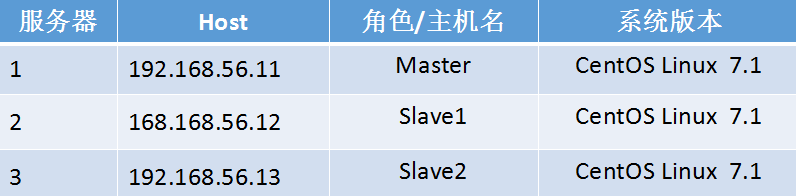
1.5 环境介绍
二、 安装ANSIBLE
2.1 yum 安装ansible
yum install ansible -y
2.2 定义HOST INVENTORY
vim /etc/ansible/hosts
[Master]
192.168.56.10 ansible_ssh_user=root ansible_ssh_pass=123456
[Slave]
192.168.56.11 ansible_ssh_user=root ansible_ssh_pass=123456
192.168.56.12 ansible_ssh_user=root ansible_ssh_pass=123456
参数介绍:
ansible基于ssh连接inventory中指定的远程主机时还可以通过参数指定其交互方式常用的参数如下所示
ansible_ssh_host # 要连接的主机名
ansible_ssh_port # 端口号默认是22
ansible_ssh_user # ssh连接时默认使用的用户名
ansible_ssh_pass # ssh连接时的密码
ansible_sudo_pass # 使用sudo连接用户是的密码
ansible_ssh_private_key_file # 秘钥文件如果不想使用ssh-agent管理时可以使用此选项
ansible_shell_type # shell的类型默认sh
#########################################################################################
ansible的循环机制还有更多的高级功能具体请参见官方文档
http://docs.ansible.com/ansible/playbooks_loops.html
注意:ansible常用语法
ansible <Host-partten> -m MOE -a 'MOD_ARV'所支持的模块可以使用ansible-doc -l来查看
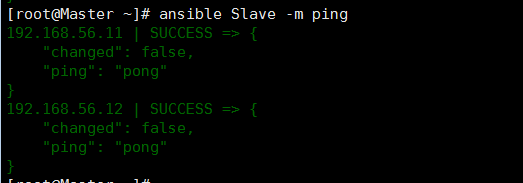
2.3 测试ansible
ansible Slave -m ping
三、常用模块及操作
3.1 ping模块
ansible Slave -m ping
或者
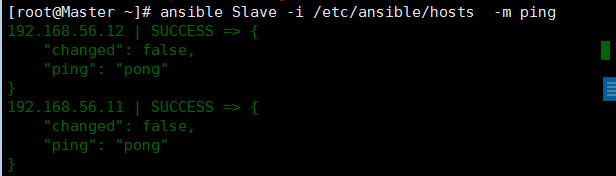
ansible Slave -i /etc/ansible/hosts  -m ping
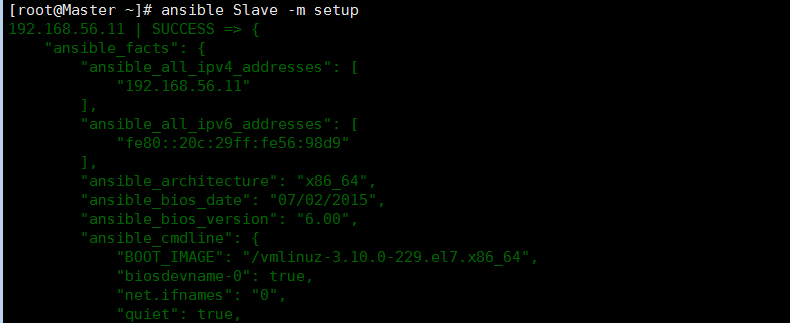
3.2 setup模块
## 用来查看远程主机的一些基本信息
ansible Slave -m setup
3.3 file模块
## 远程文件符号链接创建
ansible Slave -m file -a "src=/etc/resolv.conf dest=/tmp/resolv.conf state=link"
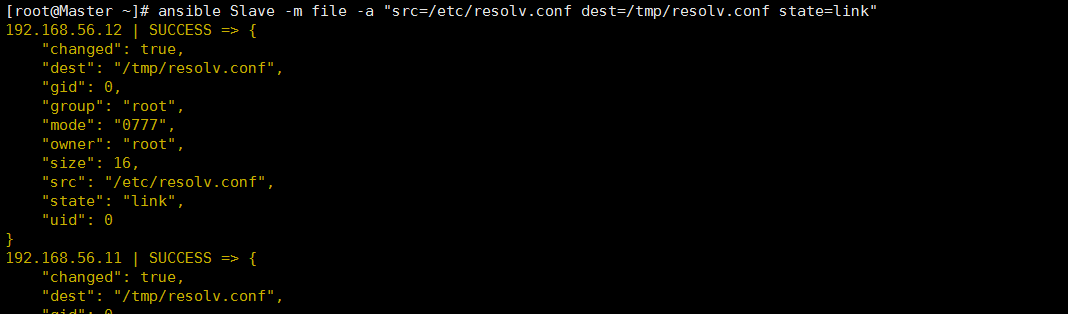
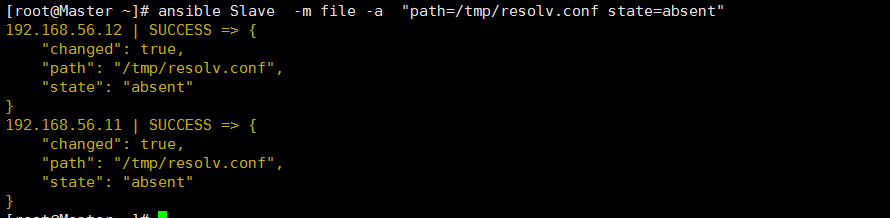
## 远程文件符号链接查看

## 远程文件符号链接删除
3.4 copy 模块
## 将本地文件“/etc/ansible/ansible.cfg”复制到远程服务器
ansible Slave -m copy -a "src=/etc/ansible/ansible.cfg dest=/tmp/ansible.cfg owner=root group=root mode=0644"
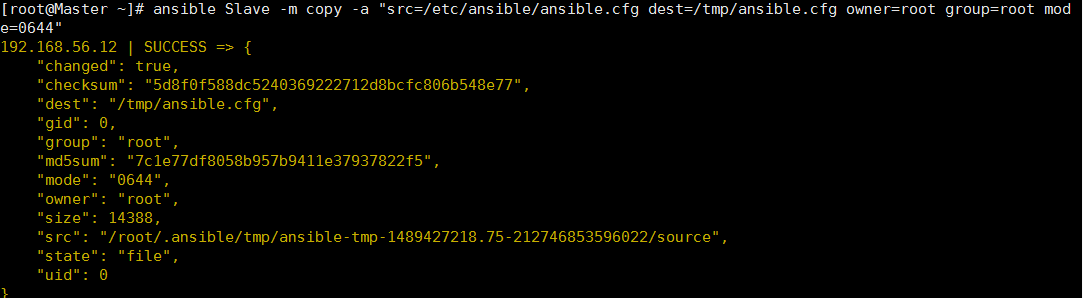
## 查看

3.5 command模块
3.6 shell
[root@Master ~]# cat /tmp/test.sh
#!/bin/sh
date +%F_%H:%M:%S

#chmod +x /tmp/test.sh
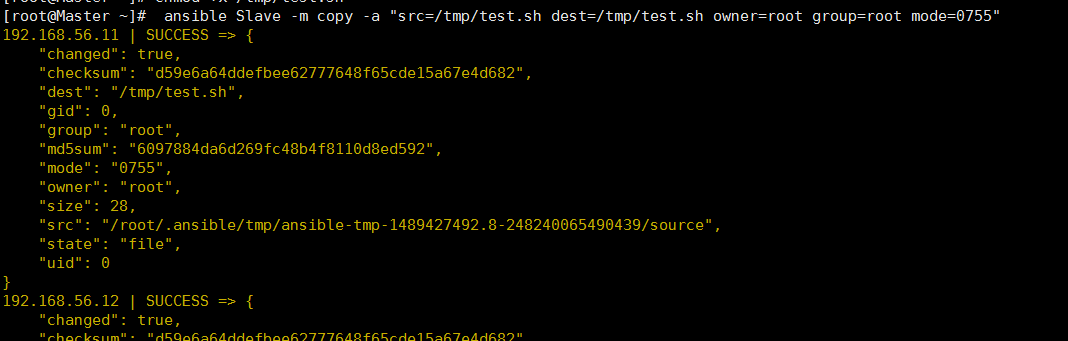
## 将创建的脚本文件分发到远程
ansible Slave -m copy -a "src=/tmp/test.sh dest=/tmp/test.sh owner=root group=root mode=0755"
## 远程执行

3.6 user 模块
在控制端节点添加用户
[root@Master ~]# echo "admin"|openssl passwd -1 -salt "openssl rand -hex 4" -stdin
$1$openssl $.oduSwbhLj6jqAwVsLo/H1
[root@Master ~]# ansible Slave -m user -a 'name=admin comment="ansible add user" uid=1000 password="$1$openssl $.oduSwbhLj6jqAwVsLo/H1"'
创建密码:echo "123456"|passwd --stdin admin
3.7 实现shh认证
ansible Slave -m copy -a "src=/root/.ssh/id_rsa.pub dest=/root"
ansible Slave -m shell -a "cat /root/id_rsa.pub >>/root/.ssh/authorized_keys"
此时就可以实现基于ssh秘钥通信了此时/etc/ansible/hosts可以修改如下
###### /etc/ansible/hosts
[Slave]
192.168.56.11
192.168.56.12
注意:我们之前没有对master SSH认证,是因为考虑某些公司应用服务器作为master,因此我们需要执行以下命令进行
sh-copy-id -i ~/.ssh/id_rsa.pub 192.168.56.10
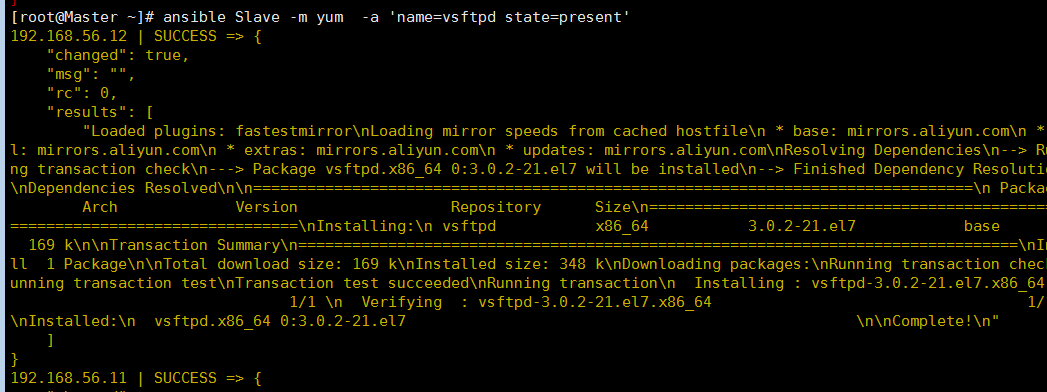
3.8 安装软件和启动服务。yum、service模块
ansible Slave -m yum -a 'name=vsftpd state=present'
#启动服务
ansible Slave -m service -a 'name=vsftpd state=started enabled=yes'
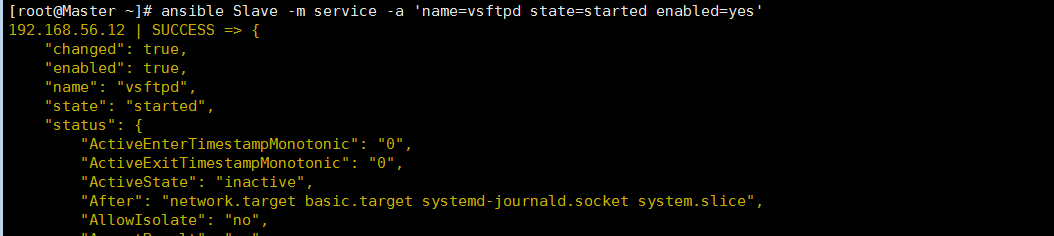
查看状态:

四、YAML语言介绍
4.1 YAML简介
“ YAML不是标记语言 ”(缩写为YAML)是一种设计为人性化的数据序列化语言,并且与常见的日常任务的现代编程语言配合良好。本规范既是对YAML语言的介绍,也是支持它的概念,也是开发所需信息的完整规范应用程序处理YAML。
开放,可互操作和易于理解的工具具有高度的计算能力。YAML从一开始就设计为对于使用数据的人有用和友好。它使用Unicode可打印字符,其中一些提供结构信息,其余包含数据本身。YAML通过最小化结构字符的数量并允许数据以自然和有意义的方式显示自己来实现独特的清洁。例如,压痕可用于结构, 冒号分开键:值对和破折号用于创建“ 项目符号 ”列表。
有无数的味道 数据结构,但它们都可以充分代表有三个基本原语: 映射(哈希/字典), 序列(数组/列表)和 标量(字符串/数字)。YAML利用这些原语,并添加了一个简单的打字系统和混叠机制形成一个完整的语言序列化任何本地数据结构。虽然大多数编程语言可以使用YAML进行数据序列化,但是YAML在处理基本上围绕三个基本原语构建的语言方面表现出色。这些包括新浪潮的敏捷语言,如Perl,Python,PHP,Ruby和Javascript。
有数百种不同的语言用于编程,但只有少数语言用于存储和传输数据。即使它的潜力是无限的,YAML专门创建,以便很好地用于常见的用例,如:配置文件,日志文件,进程间消息传递,跨语言数据共享,对象持久性和复杂数据结构的调试。当数据易于查看和理解时,编程变成一个更简单的任务。
“YAML Ain’t Markup Language” (abbreviated YAML) is a data serialization language designed to be human-friendly and work well with modern programming languages for common everyday tasks. This specification is both an introduction to the YAML language and the concepts supporting it, and also a complete specification of the information needed to develop applications for processing YAML.
Open, interoperable and readily understandable tools have advanced computing immensely. YAML was designed from the start to be useful and friendly to people working with data. It uses Unicode printable characters, some of which provide structural information and the rest containing the data itself. YAML achieves a unique cleanness by minimizing the amount of structural characters and allowing the data to show itself in a natural and meaningful way. For example, indentation may be used for structure, colons separate key: value pairs, and dashes are used to create “bullet” lists.
There are myriad flavors of data structures, but they can all be adequately represented with three basic primitives: mappings(hashes/dictionaries), sequences (arrays/lists) and scalars (strings/numbers). YAML leverages these primitives, and adds a simple typing system and aliasing mechanism to form a complete language for serializing any native data structure. While most programming languages can use YAML for data serialization, YAML excels in working with those languages that are fundamentally built around the three basic primitives. These include the new wave of agile languages such as Perl, Python, PHP, Ruby, and Javascript.
There are hundreds of different languages for programming, but only a handful of languages for storing and transferring data. Even though its potential is virtually boundless, YAML was specifically created to work well for common use cases such as: configuration files, log files, interprocess messaging, cross-language data sharing, object persistence, and debugging of complex data structures. When data is easy to view and understand, programming becomes a simpler task.
4.2 YAML目标
The design goals for YAML are, in decreasing priority:
YAML is easily readable by humans.
YAML data is portable between programming languages.
YAML matches the native data structures of agile languages.
YAML has a consistent model to support generic tools.
YAML supports one-pass processing.
YAML is expressive and extensible.
YAML is easy to implement and use.
YAML的设计目标是,优先级降低:
YAML容易被人阅读。
YAML数据在编程语言之间是可移植的。
YAML匹配 敏捷语言的本地数据结构。
YAML有一个一致的模型来支持通用工具。
YAML支持一遍处理。
YAML是表达和可扩展的。
YAML易于实现和使用。
4.3 YAML规则
大小写敏感
使用缩进表示层级关系
缩进时不允许使用Tab键,只允许使用空格。
缩进的空格数目不重要,只要相同层级的元素左侧对齐即可
# 表示注释,从这个字符一直到行尾,都会被解析器忽略。
4.4 数据结构
对象:键值对的集合,又称为映射(mapping)/ 哈希(hashes) / 字典(dictionary)
数组:一组按次序排列的值,又称为序列(sequence) / 列表(list)
纯量(scalars):单个的、不可再分的值
4.3 示例:
YAML的语法和其他高阶语言类似并且可以简单表达清单、散列表、标量等数据结构。其结构Structure通过空格来展示序列Sequence里的项用"-"来代表示Map里的键值对用":"分隔。YAML文件扩展名通常为.yaml或者.yml。
name: ZHANGYANG
age: 22
gender: M
spouse:
name: ZXP
age: 22
gender: F
children:
- name: ZXX
age: 0
gender: M
YAML 2 个重要的结构组成部分list和directory
1. 列表的所有元素均使用“-”打头例如
# A list of tasty fruits
- Apple
- Orange
- Strawberry
- Mango
2.字典通过key与valuef进行标识例如
# An employee record
name: ZHANGYANG
job: IT
skill: LINUX
也可以将key:value放置于{}中进行表示例如
# An employee record
{name: ZHANGYANG, job: IT, skill: LINUX}
多个映射关系组成一个字典一个列表可以包含多个字典。
4.4 YMAL中的变量
1.变量名仅能由字母、数字和下划线组成且只能以字母开头。
2.facts是由正在通信的远程目标主机发回的信息这些信息被保存在ansible变量中。
要获取指定的远程主机所支持的所有facts可使用如下命令进行
# ansible hostname -m setup 这个命令可以获得被监控端主机的各种信息将这些信息得到后保存到变量中。
#自定义变量
在 yaml 中可以使用vars关键字来定义变量
vars:
var_name: value
#变量的引用
{{ var_name }}
# 特殊的变量迭代
当有需要重复性执行的任务时可以使用迭代机制。其使用格式为将需要迭代的内容定义为item变量引用
示例:被控端添加2个用户
方式一、
- name: add user admin1
user: name=admin1 state=present groups=wheel
- name: add user admin2
user: name=admin2 state=present groups=whee
方式二、变量
- name: add several users
vars:
user1: admin
user2: admin
user: name={{ user1 }} state=present groups=wheel
user: name={{ user2 }} state=present groups=wheel
方式三、迭代
- name: add several users
user: name={{ item }} state=present groups=wheel
with_items:
- admin1
- admin2
事实上with_items中可以使用元素还可为hashes例如
- name: add several users
user: name={{ item.name }} state=present groups={{ item.groups }}
with_items:
- { name: 'admin1', groups: 'wheel' }
- { name: 'admin2', groups: 'root' }
神回复
发表评论:
◎欢迎参与讨论,请在这里发表您的看法、交流您的观点。