
Istio案例
浏览量:155
1、安装好Istio
# 安装 demo 配置
$ istioctl install --set profile=demo

# 设置启用自动注入 istio sidecar 的命名空间
$ kubectl label namespace default istio-injection=enabled

# 获取 nodePort 地址

export INGRESS_PORT=$(kubectl -n istio-system get service istio-ingressgateway -o jsonpath='{.spec.ports[?(@.name=="http2")].nodePort}')
export SECURE_INGRESS_PORT=$(kubectl -n istio-system get service istio-ingressgateway -o jsonpath='{.spec.ports[?(@.name=="https")].nodePort}')
export INGRESS_HOST=$(kubectl get po -l istio=ingressgateway -n istio-system -o jsonpath='{.items[0].status.hostIP}')
export GATEWAY_URL=$INGRESS_HOST:$INGRESS_PORT
echo "$GATEWAY_URL"
2、创建单个应用
$ vi myapp-demo.yaml

apiVersion: v1
kind: Service
metadata:
  name: myapp-svc
  labels:
    app: myapp
spec:
  ports:
  - port: 80
    name: http
  selector:
    app: myapp-pod
---
apiVersion: apps/v1
kind: Deployment
metadata:
  name: myapp-v1
  labels:
    app: myapp-pod
    version: v1
spec:
  replicas: 1
  selector:
    matchLabels:
      app: myapp-pod
      version: v1
  template:
    metadata:
      labels:
        app: myapp-pod
        version: v1
    spec:
      containers:
      - name: myapp-pod
        image: ikubernetes/myapp:v1
        ports:
        - containerPort: 80

$ kubectl apply -f myapp-demo.yaml

# 检查应用是否正确启用
$ kubectl get pod,svc

# 创建 Gateway 和 VirtualService
$ vi gateway.yaml
apiVersion: networking.istio.io/v1alpha3
kind: Gateway
metadata:
  name: myapp-gateway
spec:
  selector:
    istio: ingressgateway # use istio default controller
  servers:
  - port:
      number: 80
      name: http
      protocol: HTTP
    hosts:
    - "*"
---
apiVersion: networking.istio.io/v1alpha3
kind: VirtualService
metadata:
  name: myapp-vs
spec:
  hosts:
  - "*"
  gateways:
  - myapp-gateway
  http:
  - match:
    - uri:
        prefix: /
    route:
    - destination:
        host: myapp-svc.default.svc.cluster.local    # 指定 K8S 中的 svc 资源名字
        port:
          number: 80

# 启动
$ bkubectl apply -f gateway.yaml

3、创建两个应用 灰度发布流量比例9:1
# 清理上面的资源
$ kubectl delete -f gateway.yaml
$ kubectl delete -f myapp-demo.yaml

# 创建两个 pod 和 svc

$ vi myapp-demo2.yaml

apiVersion: v1
kind: Service
metadata:
  name: myapp-svc
spec:
  ports:
  - port: 80
    name: http
  selector:
    app: myapp-pod
---
apiVersion: apps/v1
kind: Deployment
metadata:
  name: myapp-v1
  labels:
    app: myapp-pod
    version: v1
spec:
  replicas: 1
  selector:
    matchLabels:
      app: myapp-pod
      version: v1
  template:
    metadata:
      labels:
        app: myapp-pod
        version: v1
    spec:
      containers:
      - name: myapp-pod
        image: ikubernetes/myapp:v1
        ports:
        - containerPort: 80
---
apiVersion: apps/v1
kind: Deployment
metadata:
  name: myapp-v2
  labels:
    app: myapp-pod
    version: v2
spec:
  replicas: 1
  selector:
    matchLabels:
      app: myapp-pod
      version: v2
  template:
    metadata:
      labels:
        app: myapp-pod
        version: v2
    spec:
      containers:
      - name: myapp-pod
        image: ikubernetes/myapp:v2
        ports:
        - containerPort: 80

kubectl apply -f myapp-demo2.yaml

# 检查应用是否正确启用
$ kubectl get pod,svc

# 创建 Gateway, VirtualService 和 DestinationRule
$ vi gateway2.yaml

apiVersion: networking.istio.io/v1alpha3
kind: Gateway
metadata:
  name: myapp-gateway
spec:
  selector:
    istio: ingressgateway # use istio default controller
  servers:
  - port:
      number: 80
      name: http
      protocol: HTTP
    hosts:
    - "*"
---
apiVersion: networking.istio.io/v1alpha3
kind: VirtualService
metadata:
  name: myapp-vs
spec:
  hosts:
  - "*"
  gateways:
  - myapp-gateway
  http:
  - route:
    - destination:
        host: myapp-svc.default.svc.cluster.local      # 指定 K8S 中的 svc 资源名字
        subset: v1
        port:
          number: 80
      weight: 90
    - destination:
        host: myapp-svc.default.svc.cluster.local      # 指定 K8S 中的 svc 资源名字
        subset: v2
        port:
          number: 80
      weight: 10
---
apiVersion: networking.istio.io/v1beta1
kind: DestinationRule
metadata:
  name: myapp-dr
  namespace: default
spec:
  host: myapp-svc.default.svc.cluster.local            # 指定 K8S 中的 svc 资源名字
  subsets:
  - labels:
      version: v1
    name: v1
  - labels:
      version: v2
    name: v2

$ kubectl apply -f gateway2.yaml
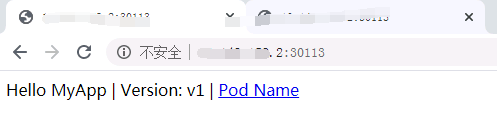
v1版本和v2版本的比例为9:1
4、其他使用操作
卸载Istio
# 使用 --purge 进行完全卸载,包含集群范围的资源,这些资源有可能是和其他Istio控制面共享的
$ istioctl x uninstall --purge

# 只卸载某个特定的Istio控制面
$ istioctl x uninstall <your original installation options>
# 或
$ istioctl manifest generate <your original installation options> | kubectl delete -f -
profile相关部分操作记录
# 使用不同的profile
$ istioctl install --set profile=demo

#列出所有的profile
istioctl profile list

打印profile的配置内容
通过 dump profile的配置内容,可以查看某些组件的默认值

$ istioctl profile dump demo

# 通过 `dump` profile的配置内容,可以查看某些组件的默认值
# 例如
$ istioctl profile dump --config-path components.ingressGateways
$ istioctl profile dump --config-path values.gateways.istio-ingressgateway


# 显示不同的profile的差异
$ istioctl profile diff default demo
神回复
发表评论:
◎欢迎参与讨论,请在这里发表您的看法、交流您的观点。