kubernetes YAML文件详解
浏览量:165
一、YAML文件概述
Kubernetes只支持YAML和JSON格式创建资源对象
JSON格式用于接口之间消息的传递,YAML格式用于配置和管理
YAML是专门用来写配置文件的语言,非常简洁和强大,使用比json更方便。它实质上是一种通用的数据串行化格式。
k8s 集群中对资源管理和资源对象编排部署都可以通过声明样式(YAML)文件来解决,也就是可以把需要对资源对象操作编辑到 YAML 格式文件中,我们把这种文件叫做资源清单文件,通过 kubectl 命令直接使用资源清单文件就可以实现对大量的资源对象进行编排部署了。
二、YAML介绍及优点
1、YAML介绍
YAML 仍是一种标记语言。为了强调这种语言以数据做为中心,而不是以标记语言为重点。
YAML 是一个可读性高,用来表达数据序列的格式。
2、YAML优点
1)YAML 文件易于人类阅读,具有表达性和可扩展性。
2)YAML 文件易于实现和使用。
3)可在编程语言之间轻松移植。
4)与敏捷语言的原生数据结构相匹配。
5)YAML 文件具有一致模型,支持通用工具。
6)YAML 文件支持 One-pass 处理。
7)使用方便,因此您无需再将所有的参数添加到命令行中。
8)易于维护 – 可以将 YAML 文件添加到源控件中以跟踪更改。
9)灵活便捷 – 可以使用 YAML 创建更加复杂的结构(相对于使用命令行可以创建的结构)
三、YAML基本语法
1)通过缩进表示层级关系,使用空格做为缩进
2)缩进的空格数目不重要,只要相同层级的元素左侧对齐即可
3)低版本缩进时不允许使用 Tab 键,只允许使用空格,使用空格一般开头缩进两个空格
4)本字符后缩进一个空格,比如冒号,逗号等后面本使用
5)---表示新的yaml文件开始
4)使用#标识注释,从这个字符一直到行尾,都会被解释器忽略
四、YAML与JSON和XML关系
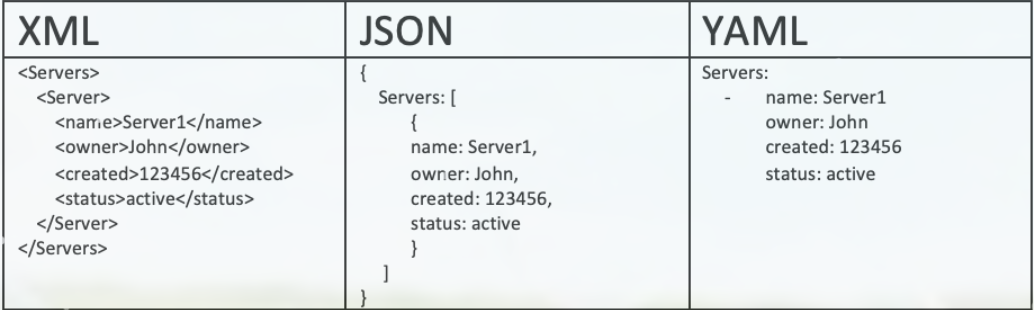
XML 是许多领域的优先采用格式。XML 最初设计为与标准通用标记语言 (SGML) 向后兼容,后者旨在支持结构化文档。因此,XML存在许多设计上的约束。
JSON 的设计理念是简单性和通用性,并且易于生成和解析。JSON 格式的可读性低,但是这种格式的数据每一种现代编程环境都可以轻松处理。
YAML 的设计目标是提升可读性,提供更加完善的信息模型。YAML 的生成和解析更加复杂,因此可以将其视为 JSON 的自然超集。每个
JSON 文件都是一个有效的 YAML 文件。
综上所述,在需要额外功能的情况下,可以轻松地从 JSON 迁移到 YAML。YAML 是从 XML 衍生而来。
五、YAML文件组成部分
YAML 文件有两个组成部分:
	1.控制器定义
	2.被控制对象
例1:控制器定义
apiVersion: apps/v1
kind:Deployment
metadata:
  name:nginx-deployment
  namespace:defalt
spec:
  replicas:3
  selector:
    matchLables:
     app:nginx
例2:被控制对象
template:
    metadata:
      labels:
        name: nginx
    spec:
      containers:
        - name: nginx
          image: nginx:latest
          imagePullPolicy: IfNotPresent
          ports:
            - containerPort: 80
六、YAML在kubernetes中的使用
Kubernetes 资源是通过声明的方式创建的,因此可以使用 YAML 文件。
Kubernetes 资源(比如 Pod、服务和部署)是使用 YAML 文件创建的。
YAML文件开头需要编写标签信息,对应不同资源信息
1、查看kubernetes的api版本
[operation@wx-oa-dangjian-ceshi ~]$ kubectl api-versions
admissionregistration.k8s.io/v1
apiextensions.k8s.io/v1
apiregistration.k8s.io/v1
apps/v1    ##应用资源
app/v1beta2 ##测试版本
authentication.k8s.io/v1
authorization.k8s.io/v1
autoscaling/v1
autoscaling/v2beta1  #弹性伸缩资源
autoscaling/v2beta2
batch/v1
batch/v1beta1
catalog.cattle.io/v1
certificates.k8s.io/v1
cluster.x-k8s.io/v1alpha3
cluster.x-k8s.io/v1alpha4
coordination.k8s.io/v1
crd.projectcalico.org/v1
discovery.k8s.io/v1
discovery.k8s.io/v1beta1
events.k8s.io/v1
events.k8s.io/v1beta1
fleet.cattle.io/v1alpha1
flowcontrol.apiserver.k8s.io/v1beta1
gitjob.cattle.io/v1
internal.apiserver.k8s.io/v1alpha1
management.cattle.io/v3
monitoring.coreos.com/v1
networking.k8s.io/v1
node.k8s.io/v1
node.k8s.io/v1alpha1
node.k8s.io/v1beta1
policy/v1
policy/v1beta1
project.cattle.io/v3
provisioning.cattle.io/v1
rbac.authorization.k8s.io/v1  #权限控制资源
rbac.authorization.k8s.io/v1alpha1
rke-machine-config.cattle.io/v1
rke-machine.cattle.io/v1
rke.cattle.io/v1
scheduling.k8s.io/v1
scheduling.k8s.io/v1alpha1
storage.k8s.io/v1
storage.k8s.io/v1alpha1
storage.k8s.io/v1beta1
ui.cattle.io/v1
v1
2、编写YAML
$ vim nginx.yaml
apiVersion: apps/v1   ##版本号 ,pod资源
kind: Deployment      ##类型/控制器
metadata:               ##数据标签
  name: nginx-deployment
  labels:	##子标签
    app: nginx	##业务容器
spec:
  replicas: 3	##副本集
  selector:	##选择器
    matchLabels: ##匹配标签
      app: nginx ##对应上面的业务容器
  template:	##模板
    metadata:
      labels:
        app: nginx
    spec:
      containers:       ##容器
      - name: nginx     ##对应上面的业务容器
        image: nginx:1.19.6   ##使用镜像信息
        ports:
        - containerPort: 80    ##容器端口信息
---
apiVersion: v1        ##版本号
kind: Service        ##服务类型
metadata:
  name: nginx-service
  labels:
    app: nginx
spec:
  type: NodePort     ##端口映射
  ports:
  - port: 80 		##内部端口
    targetPort: 80   ##映射端口
  selector:       ##选择器/
    app: nginx			##选择业务进行发布
3、执行创建
#测试yaml命令正确性
$ kubectl create -f nginx.yaml --dry-run
W0328 11:07:23.599982   29821 helpers.go:555] --dry-run is deprecated and can be replaced with --dry-run=client.
replicationcontroller/nginx-controller created (dry run)
service/nginx-service-nodeport created (dry run)

#执行创建
$kubectl create -f nginx.yaml
4、访问pod资源
$  kubectl get svc
NAME                     TYPE        CLUSTER-IP      EXTERNAL-IP   PORT(S)        AGE
kubernetes               ClusterIP   10.96.0.1       <none>        443/TCP        12d
nginx-service-nodeport   NodePort    10.96.223.235   <none>        80:30001/TCP   2d18h
$ curl 10.191.25.8:30001
<!DOCTYPE html>
<html>
<head>
<title>Welcome to nginx!</title>
<style>
    body {
        width: 35em;
        margin: 0 auto;
        font-family: Tahoma, Verdana, Arial, sans-serif;
    }
</style>
</head>
<body>
<h1>Welcome to nginx!</h1>
<p>If you see this page, the nginx web server is successfully installed and
working. Further configuration is required.</p>

<p>For online documentation and support please refer to
<a href="http://nginx.org/">nginx.org</a>.<br/>
Commercial support is available at
<a href="http://nginx.com/">nginx.com</a>.</p>

<p><em>Thank you for using nginx.</em></p>
</body>
</html>
七、YAML文件模板生成/导出
1、利用nginx镜像创建资源生成yaml格式文件
$ kubectl create deployment  web --image=nginx:1.19.6--port=80 --replicas=3 --dry-run -o yaml > my1.yaml
W0328 11:11:37.885893    1532 helpers.go:555] --dry-run is deprecated and can be replaced with --dry-run=client.
$ cat my1.yaml
apiVersion: apps/v1
kind: Deployment
metadata:
  creationTimestamp: null
  labels:
    app: web
  name: web
spec:
  replicas: 3
  selector:
    matchLabels:
      app: web
  strategy: {}
  template:
    metadata:
      creationTimestamp: null
      labels:
        app: web
    spec:
      containers:
      - image: nginx:1.19.6--port=80
        name: nginx
        resources: {}
status: {}
2、利用nginx镜像创建资源,生成json格式文件
$  kubectl create deployment  web --image=nginx:1.19.6 --port=80 --replicas=3 --dry-run -o json > my1.json
W0328 11:12:42.751551    2644 helpers.go:555] --dry-run is deprecated and can be replaced with --dry-run=client.

$ cat my1.json
{
    "kind": "Deployment",
    "apiVersion": "apps/v1",
    "metadata": {
        "name": "web",
        "creationTimestamp": null,
        "labels": {
            "app": "web"
        }
    },
    "spec": {
        "replicas": 3,
        "selector": {
            "matchLabels": {
                "app": "web"
            }
        },
        "template": {
            "metadata": {
                "creationTimestamp": null,
                "labels": {
                    "app": "web"
                }
            },
            "spec": {
                "containers": [
                    {
                        "name": "nginx",
                        "image": "nginx:1.19.6",
                        "ports": [
                            {
                                "containerPort": 80
                            }
                        ],
                        "resources": {}
                    }
                ]
            }
        },
        "strategy": {}
    },
    "status": {}
}
3、将现有资源生成的末模板导出到文件
1、查看现有资源
$  kubectl get pods,deploy
NAME                         READY   STATUS    RESTARTS   AGE
pod/nginx-controller-f4sjp   1/1     Running   0          2d18h
pod/nginx-controller-kjqtk   1/1     Running   0          71m
2、导出资源成yaml
$ kubectl get pods,deploy
NAME                                    READY   STATUS    RESTARTS   AGE
pod/nginx-deployment-76ccf9dd9d-6z4z5   1/1     Running   0          5s
pod/nginx-deployment-76ccf9dd9d-86nkn   1/1     Running   0          5s
pod/nginx-deployment-76ccf9dd9d-9tmrf   1/1     Running   0          5s

NAME                               READY   UP-TO-DATE   AVAILABLE   AGE
deployment.apps/nginx-deployment   3/3     3            3           5s
3、导出资源成yaml写入文件
$ kubectl get deployment/nginx-deployment  -o=yaml > test.yaml
[operation@wx-oa-dangjian-ceshi k8s-work]$ cat test.yaml
apiVersion: apps/v1
kind: Deployment
metadata:
  annotations:
    deployment.kubernetes.io/revision: "1"
    field.cattle.io/publicEndpoints: '[{"port":42440,"protocol":"TCP","serviceName":"default:nginx-service","allNodes":true}]'
  creationTimestamp: "2022-03-28T03:17:06Z"
  generation: 2
  labels:
    app: nginx
  name: nginx-deployment
  namespace: default
  resourceVersion: "2153660"
  uid: e8865ef5-5fcf-43c5-8571-c727e1956285
spec:
  progressDeadlineSeconds: 600
  replicas: 3
  revisionHistoryLimit: 10
  selector:
    matchLabels:
      app: nginx
  strategy:
    rollingUpdate:
      maxSurge: 25%
      maxUnavailable: 25%
    type: RollingUpdate
  template:
    metadata:
      creationTimestamp: null
      labels:
        app: nginx
    spec:
      containers:
      - image: nginx:1.19.6
        imagePullPolicy: IfNotPresent
        name: nginx
        ports:
        - containerPort: 80
          protocol: TCP
        resources: {}
        terminationMessagePath: /dev/termination-log
        terminationMessagePolicy: File
      dnsPolicy: ClusterFirst
      restartPolicy: Always
      schedulerName: default-scheduler
      securityContext: {}
      terminationGracePeriodSeconds: 30
status:
  availableReplicas: 3
  conditions:
  - lastTransitionTime: "2022-03-28T03:17:09Z"
    lastUpdateTime: "2022-03-28T03:17:09Z"
    message: Deployment has minimum availability.
    reason: MinimumReplicasAvailable
    status: "True"
    type: Available
  - lastTransitionTime: "2022-03-28T03:17:06Z"
    lastUpdateTime: "2022-03-28T03:17:09Z"
    message: ReplicaSet "nginx-deployment-76ccf9dd9d" has successfully progressed.
    reason: NewReplicaSetAvailable
    status: "True"
    type: Progressing
  observedGeneration: 2
  readyReplicas: 3
  replicas: 3
  updatedReplicas: 3
八、资源清单描述方法
在 k8s 中,一般使用 YAML 格式的文件来创建符合我们预期期望的 pod,这样的 YAML 文件称为资源清单。
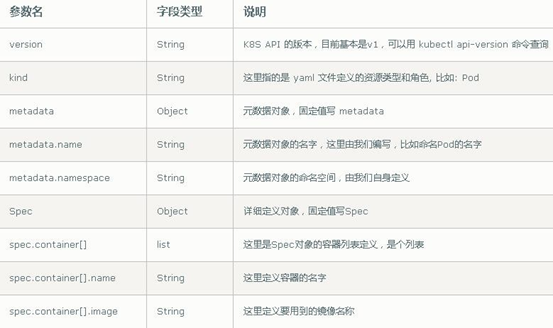
1、必要字段
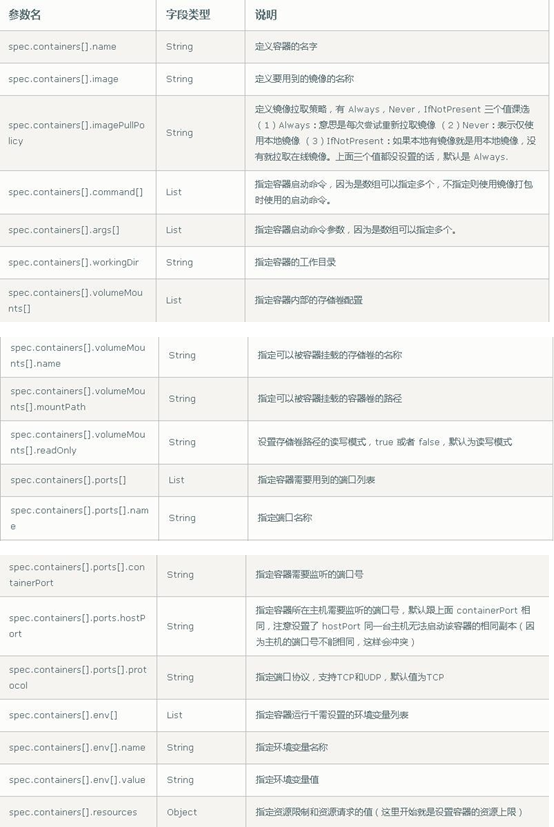
2、spec主要对象
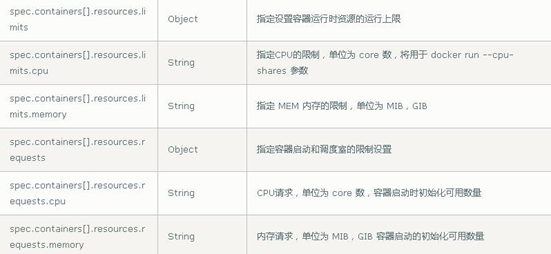
3、额外参数