
Linux下使用Strongswan搭建IPSec VPN
浏览量:2788
一、方案背景及需求分析
为保证各分支节点到中心节点的数据安全,需要在分支节点与中心节点之间连接IPSec VPN,实现Site-To-Site之间数据的完整性、私密性、不可否认性。客户当前环境有一台H3C F1080防火墙作为中心节点,分支节点均无网络设备,通过Linux操作系统实现VPN功能,并与中心节点防火墙建立VPN隧道。
二、解决方案
在分支站点出口部署一台Linux服务器,安装开源软件Strongswan,配置Site-To-Site IPSec VPN功能.
三、拓扑结构
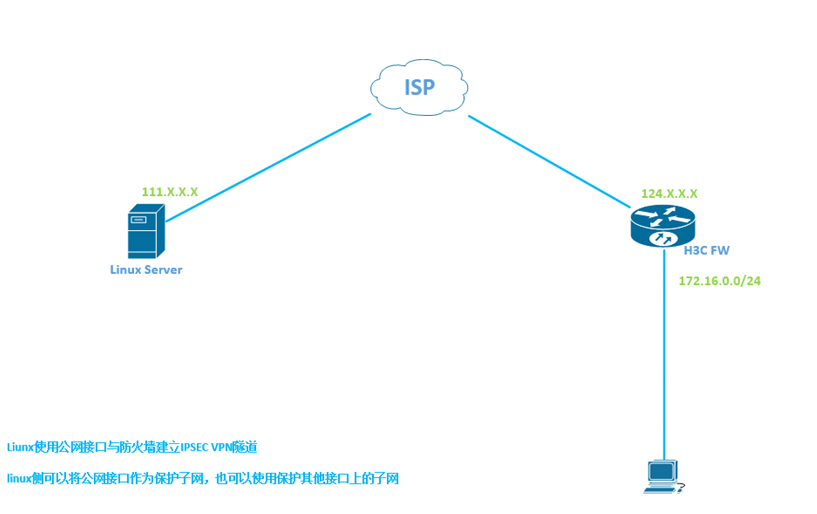 .
.
四、测试组件
• 硬件防火墙:H3C FW1080 OS 7.1
• Liunx 操作系统:CentOS 7.0
• VPN软件:StrongSwan 5.4.0
五、安装配置
5.1 更新yum 安装源
yum install epel-release -y
5.2 yum 安装 strongswan
yum install strongswan -y
5.3 配置strongswan
5.3.1 SA参数修改
vi /etc/strongswan/ipsec.conf
conn h3c
       keyexchange=ikev1             #使用Isakmp ikev1
       auto=start                    #自动启动该连接
       aggressive=yes                #IPSEC 主动模式
       #本端信息
       left=111.205.x.x           #Linux系统公网接口IP
       leftid=111.205.x.x        #使用IP地址作为IPSEC设备ID
       leftsubnet=*.*.*.0/24         #Linux站点侧要保护的子网,可以是该系统的接口IP
       #对端信息
       right=124.205.x.x          #防火墙公网接口IP
       rightid=124.205.x.x       #使用IP地址作为IPSEC设备ID
       rightsubnet=192.168.10.0/24   #防火墙侧要保护的子网
       leftauth=psk                  #认证方式为预共享密钥
       rightauth=psk                 #认证方式为预共享密钥
       type=tunnel                   #IPSEC模式为隧道模式
       ike=aes128-md5-modp1024       #IPSEC 第一阶段密钥参数
       esp=aes128-sha1               #IPSEC 第二阶段加密参数
5.3.2 密钥PSK配置
111.205.x.x 124.205.x.x : PSK 99bc773ea2791568690xxxxxxxx
##本端IP    对端IP :      PSK 预共享密钥
5.3.3 配置linux IPv4转发
编辑/etc/sysctl.conf
将net.ipv4.ip_forward 的值修改为1。
执行sysctl -p(将有错误的部分在/etc/sysctl.conf中使用#注释掉,再次执行sysctl-p)。
5.3.4 启动strongswan
strongswan restart
查看链路建立状态strongswan statusall,例:
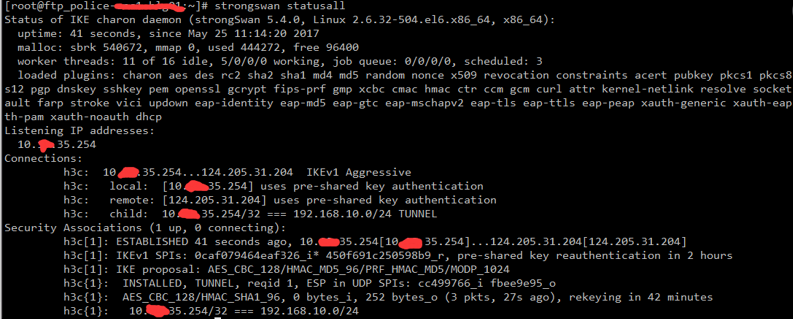
Security Associations (1 up, 0 connecting)即为链路已通
5.3.5 strongswan相关命令
Strongswan start 启动strongswan
Strongswan restart 重新启动strongswan
Strongswan stop 停止strongswan
Strongswan status 查看vpn连接状态
Strongswan statusall 查看vpn明细状态
神回复
发表评论:
◎欢迎参与讨论,请在这里发表您的看法、交流您的观点。